
Quick Answer
Add both diamonds and the missing line, then switch to horizontal. The circles are not what you are missing: the yellow base glyph already has them, so do not send an extra standalone circle. In We Were Here Tomorrow, H25A is part of TRC and Symbol Synthesis, where you use charged blocks and synthesis controls to build your partner's requested symbols.
When you see component symbols, diamonds and circles, or the orientation control, H25A combined symbols, H25A diamonds and circles, and H25A horizontal glyph puzzle all refer to the same synthesis puzzle.
Where Do You Solve H25A, and What Do You Need?
H25A is in the TRC and Symbol Synthesis section. You bring charged blocks to the synthesis machine, combine the glyphs your partner asks for, and switch the later combination to horizontal. The machine has slots for charged blocks and controls for combining symbols. Your partner describes the symbol you need to make.
Build from the pieces your controls can supply. Don't look for one finished symbol that matches the target. Charged blocks let you build more complex combinations. If you are working through the We Were Here Tomorrow puzzles in order, keep the early combinations and the later diamonds-and-circles combination apart. Their circle rules are opposite.
Why Is H25A Called Combined Symbols, Diamonds and Circles, or the Horizontal Glyph Puzzle?
These names describe the same synthesis puzzle, with each name pointing to a different part of the solution.
- H25A combined symbols: You select component glyphs that combine into the symbol your partner needs. The supplied symbols are pieces to overlay, rather than finished copies of the target.
- H25A diamonds and circles: The later combination includes diamond components and circles already present in the yellow base glyph. Counting only the components you send misses part of the finished design.
- H25A horizontal glyph puzzle: The receiving display's orientation matters. Changing the later combination from vertical to horizontal is part of the successful solution, rather than a cosmetic adjustment.
How Do the H25A Combined Symbols Work?
Stack the glyphs you have until they make your partner's symbol, and add charged blocks when the machine needs a more complex combination.
- Your partner describes the target's shapes and lines.
- You pick the component symbols that supply those parts.
- Combine them and add charged blocks when needed.
- Compare the result with the target, including how its circles meet.
A component can supply part of a bigger figure even when it looks nothing like that figure on its own. So describe the pieces, not the whole picture: the central line, the arrows, and the circles.
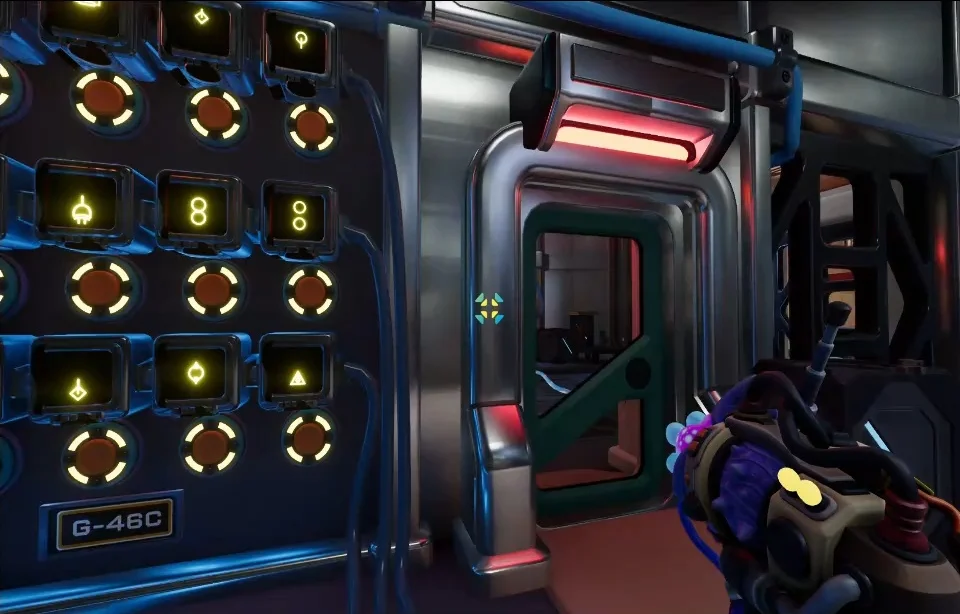
The component side: each screen shows one glyph piece, with its button underneath.
| What your partner describes | What to check |
|---|---|
| The circles | Do they touch at one point, or is there a gap? |
| The central line | Does it run through the middle of the figure? |
| The arrows | Which way they point and where they start |
The early combination needs touching circles. "It looks like an eight" is not enough, because it leaves out whether the two circles touch. Say it out loud: touching, or a gap.
The early touching-circle solution does not apply to the later diamonds-and-circles combination. In that later stage, the required circles must remain separate, without touching or intersecting.
How Do You Solve H25A Diamonds and Circles?
Count what the yellow base already has, add both diamonds, and fill the missing central line. Don't add a circle.
The easy mistake here is to keep sending circles because the reference has circles. The base already supplies them. Every shape gets used once, so the circles in the base count.
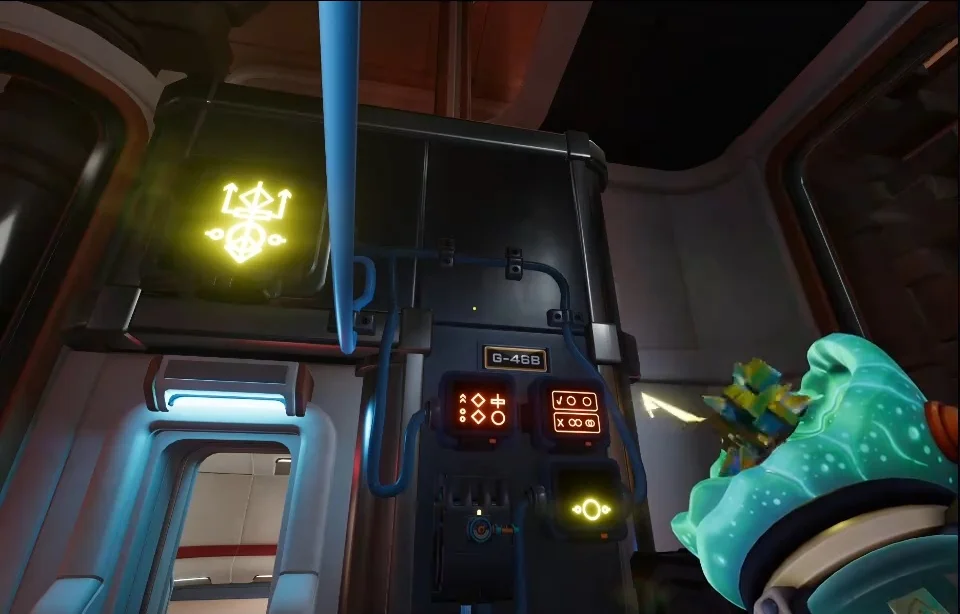
The partner's side: the yellow target glyph up top, and the two rule panels below it.
- Read both references together. Use every element in the left reference, and meet the right reference's rule: the required circles must be separate.
- Count what is already there. The yellow base has a large hollow circle and two smaller hollow circles with short bars sticking out. Those circles already count toward the combination.
- Add both diamond components. One gives a line above its diamond, the other a line below. Together they still leave a gap in the middle.
- Fill that gap. Pick the component that looks like a vertical line with a circle below it. Its line fills the missing section through the rectangle.
- Set the receiving display to horizontal. This lets that component's circle overlap an existing element the right way, and the combination completes.
| Piece | Where it comes from |
|---|---|
| Large hollow circle | Already in the yellow base |
| Two small circles with bars | Already in the yellow base |
| Line above a diamond | First diamond component |
| Line below a diamond | Second diamond component |
| Line through the rectangle | Vertical line with a circle below it |
Do not send another circle just because the reference includes circles. The base already supplies them. Some players repeatedly tried adding a separate circle; the useful addition is the component that fills the missing line.
Why Does the H25A Horizontal Glyph Puzzle Fail in Vertical Orientation?
Switch the receiving display to horizontal. In vertical the later combination never resolves, and horizontal is what lets the line-and-circle component fit.
It is easy to write orientation off. Some players decided vertical and horizontal looked the same and kept building in vertical, because the arrows and diamonds all point straight up and down. The combination only solved once they switched to horizontal.
If both diamonds are in and it still fails, check the middle of the figure first: the line has to pass through the rectangle. Then check orientation before you add anything else. The circle on that line overlaps an existing element in the working arrangement, so seeing it there does not mean you should send another circle.
Once the combination works, the doors open. Go through the elevator and charging sequence, then pull the lever to start the system. Next, continue with the control room coordinate setting.
FAQ
Combine component glyphs until they match the symbol your partner describes, and add charged blocks when needed. Describe the lines, arrows, and how the circles meet separately, so you can tell which pieces make up the target.
Add the two diamond components and the line-with-circle component that fills the central gap. The circles in the yellow base already count, so leave out any extra standalone circle.
Switch the receiving display from vertical to horizontal after adding the diamonds and the missing-line component. Horizontal lets the attached circle overlap an existing element correctly.