
Quick Answer
Place the projection device at its starting position, let your partner cross, then move it to the other side. The Department Head Office missing walkway is a projected route, not a permanently connected bridge. In We Were Here Tomorrow, Department Head Office access also involves coordinating your positions and exchanging timelines to collect fuses.
The gap ahead is called the Department head office projection bridge or Department head office missing walkway; Department head office pink fuse refers to the related fuse collection step along this route.
Where Do You Solve Department Head Office Access?
Pick up and reposition the projection device during the Time Crystal chapter to open the Department Head Office route for your partner. You need both players to coordinate the crossing: one handles the device while the other follows the walkway it creates.
If you're looking at an empty outline where a bridge should be, check the projection device for an interaction first. The thing most pairs miss is that you can take it off and carry it. Leave it where it is and the route looks broken, even though you already have what you need to continue.
Why Is It Called the Projection Bridge or Missing Walkway?
The projection bridge and missing walkway are two descriptions of the same route, while the pink fuse is a collection objective connected to this section.
- Department head office projection bridge: You see a route created by a projection. This describes how the crossing works, but the device must be moved as your partner advances.
- Department head office missing walkway: You see a gap or an empty bridge outline. The gap does not mean you should keep looking for a permanent walkway; repositioning the projection supplies the usable route.
- Department head office pink fuse: You are trying to collect the fuse associated with this part of the route. The fuse and the movable projection device are separate things, so finding one does not replace the crossing steps.
How Does the Department Head Office Projection Work?
The device projects a walkway for your partner, and the two timelines don't have the same walkable paths.
So what you can see is only half of it. A projected section can be your partner's route even when you can't walk that section yourself. After you place the device, ask whether their path showed up. Don't judge it by what you can reach.
One placement is not enough. The starting position gets your partner over the first section, and moving the device to the other side lets them keep going.
| Placement | What it does |
|---|---|
| Starting position | Gets your partner across the first section |
| Other side | Lets your partner continue after the first section |
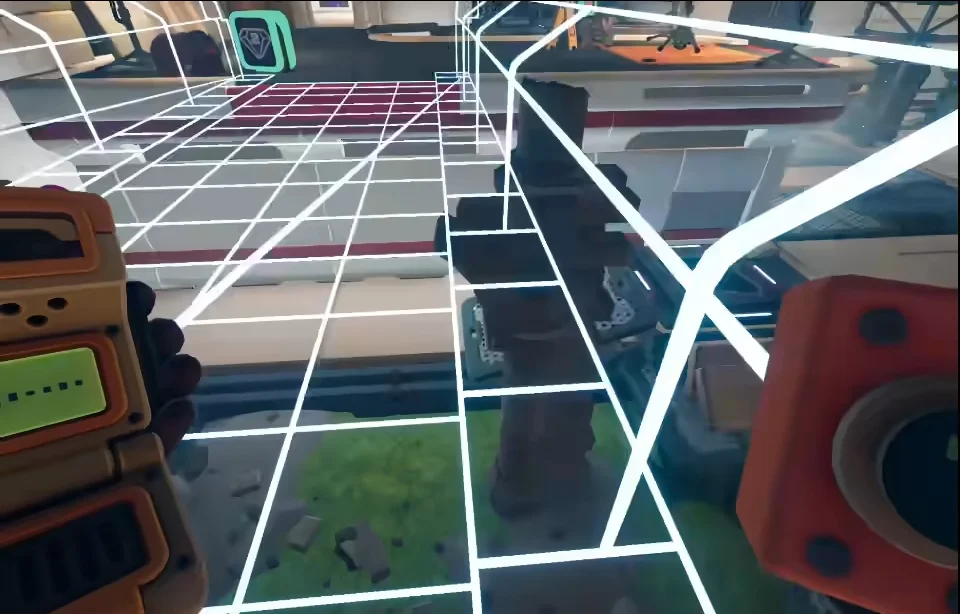
The projected walkway: a white grid over the gap that your partner can walk on.
It looks like a bug, and at least one pair thought it was one until they found the projection interaction. It isn't. Check whether you can pick up the device before you give up on the crossing.
How Do You Cross the Department Head Office Missing Walkway?
Restore the first projection, let your partner finish that crossing, and then move the device to the other side.
- Pick up the projection device. Interact with the device itself. It can be taken out of its position, so do not limit your checks to nearby doors or the gap ahead.
- Place it in the starting position. If you have already moved it while experimenting, return it to the position that gives your partner the first usable section.
- Let your partner cross that section. Have them tell you when they are across. Their progress determines when you should move the projection again.
- Move the device to the other side. Once your partner has passed the first section, relocate the projection to provide the continuation.
- Let your partner continue along the new route. Coordinate from their side of the gap, since a section you cannot traverse yourself can still be the correct path for them.
The one rule that matters: confirm the crossing before you move the device. Moving it is part of the solution, but moving it before your partner has used the current position doesn't finish that stage. If you moved it too early, put it back in the starting position and start the crossing again.
How Do You Reach the Department Head Office Pink Fuse Route?
Use the projected crossing and exchange timelines to put the player with the needed tool on the side where they can collect the fuse.
- Finish the relevant crossing first. The projection provides access to the side where a fuse can be collected.
- Get each other in view before exchanging timelines. You need to see your partner to exchange. If the interaction is unavailable, change your position or turn toward the other side until you can see one another.
- Use the exchanged access to collect the fuse. This section includes a fuse reached through the ventilation route. Coordinate the swap around who needs access and who has the tool for the pickup.
- Return to the panels with your collected fuses. Continue with the Time Crystal fuse panels once you have finished the access and collection steps.
Do not rely on leaving a block behind before exchanging timelines. In that attempted workaround, the block disappeared after the player left, so it did not preserve access for the partner.
How Do You Open the Two-Unit Pressure Plate Door?
Meet the plate's two-unit weight requirement by coordinating with your partner and applying the tool interaction to them, then hold position while the other player collects the item.
Get your partner in view before attempting the interaction. If you cannot reach them from your current position, adjust where you stand rather than repeatedly trying from the same edge. Use the door opening as your cue that the plate requirement has been met, and keep the player on the plate still during collection.
This access step and the projection crossing solve different obstacles within the same route. Complete the door pickup as well as the walkway crossing before moving on to arranging the collected fuses.
Next, continue to the Time Crystal fuse panels. When you reach the final arrangement, follow the Time Crystal final fuse layout.
FAQ
Give your partner the first projected crossing, wait until they are across, and relocate the device to the opposite side. The device can be picked up; it does not have to stay in its original position.
Create the route by repositioning the projection device. Check your partner's access after each placement because the usable walkways differ between timelines.
Coordinate the projection crossing and timeline exchanges so the player with the required tool can reach the pickup. Get each other in view before exchanging, and include the ventilation route when collecting the fuses.